|
Improve and speed up the use of your Internet Explorer - Page3 |
|
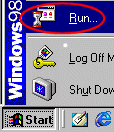
The settings: First thing you need to do is go to the START menu and select the 'RUN' icon/option:
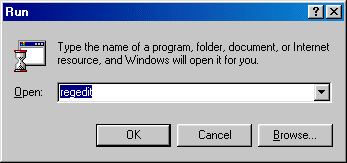
A new window will appear like the one below; in the text box of the new window you need to type 'regedit' and then click the OK key:
A new window will open not dissimilar to 'Windows Explorer', although still very different, simply used in the same way. From now on we are going to get a little complicated, if you can't follow then refer to your Windows9x instruction manual for details of the registry. Now in the registry editor, go to:
Now look to see if the following two strings exist in the right hand view:
If they do, then right click on the first and MODIFY it with a decimal value of 6, do the same for the second using a decimal value of 8. Chances are they won't exist, so find some white space (not over an existing entry) in the right hand area and RIGHT CLICK your Mouse. From here select NEW followed by DWORD Value. Enter the first string (above) and press return, then repeat the procedure for the second string and modify the values as mentioned above. |
Now all you need to do is quit the registry editor and load up IE5, all the changes should be in place and there's no need to reboot. The final tips That just about covers what you need to do with modern browsers, all the more complicated details are handled automatically, however we do have some quick tips to finish up with and help you maintain speedy and reliable browsing: 1) DO NOT use the 'off-line browser add-on pack' available for Internet Explorer 5 (windows update) as it actually disables 'off-line' content through IE directly. Microsoft neglected to provide details for setting it up and so you're better off just avoiding it all together, the internal system of IE is a lot more user friendly. 2) If you're using IE5 then avoid third part Internet cache managers for supposed 'faster off-line browsing', most of them are likely to do more harm than good. 3) Avoid programs that tweak your TMU/MTU and related registry entry's to improve speed (TweakDUN etc.), 9 times out of 10 they'll do more harm than good. Your network connections are very delicate and should be left well alone, especially under Wind98SE that has built-in fixes for most problems. Note that all websites you visit are cached, however you can cache them more effectively by loading IE and going to FAVOURITES. From the menu select ORGANISE FAVOURITES and then from the list of 'bookmarks', select a site you visit often and on the left you will notice a box for 'off-line', click it and that site can then be updated into cache whenever you choose from the TOOLS > SYNCRONIZE menu in IE. That just about sums things up, except to say that some of the things mention in this article can be tweaked differently depending on connection, use a little logic. If anybody has additional suggestions for enhancing browser performance then please contact us so we can add or update this guide as required. <<[Main Page] |