|
Improve and speed up the use of your Internet Explorer - Page2 |
|
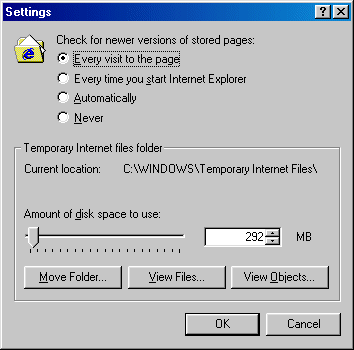
Notice the area inside the red circle and the two arrows pointing to points of use, for now we'll skip the 'Temporary Internet Files' and look strait at the second arrow that points to 'History'. As is just readable, History is the amount of days that cache for any one particular page is kept in memory. If you are a daily browser who frequently visits the same sites each day, then set this to around 5 (days) as we have done. This will help keep the cache up to date and allow you to view it off-line. On the other hand, if you only use the Internet once or twice every week or want to view pages off-line for speed, then set this to around 14. Now look at the first arrow inside the 'Temporary Internet Files' area, this is the place that allows you access to more detailed management of physical cache files. Click on SETTINGS and the following window will appear:
It's probably wise to check the 'Every visit to the page' option at the top, this means that the cache instantly updates the moment you load a page up and not under any kind of timescale. With the exception of 'Never', all the other options will do the same unless you set some more complex variables; these aren't needed in this simple guide, so we'll leave them. |
Optimise your Cache Lastly you'll need to set how much 'disk space' you want your cache (Internet files) to take up, but avoid changing the storage folder for the cache as this can cause problems. If you're a regular net user than set this to around 200mb, anymore and old cache files can conflict with new to cause strange problems. If you visit around 50pages a day for whatever reason then it might be best set to 500mb, infrequent net users should keep things at 200mb provided they don't visit tens of pages. Essentially the lower the better, just remember that really low settings will cause your browser to reload ALL web page images when updating sites, drastically increasing load time (don't go below 100mb). The physical software increase There's a new registry tweak been doing the rounds lately for Windows9x (98/98SE has been tested, untested on Win95) that physically increases the speed you browse without change in connection or protocols. Note, ISPreview should NOT be held responsible for any damage this tweak may do, playing around with your registry is a risky business and not something you should attempt unless familiar. ALWAYS backup your registry before performing any changes. What most people don't realise is that 95% of browsers such as IE5 comply with the 'Hypertext Protocol 1.1', this means the browser can draw no more than two streams of data at any one time. The reason for this is to lower the load on web server ports and data transfers, which is why when you're on a connection such as ADSL, pages still load and aren't quite instant. However browsers can actually cope with more data streams, thus meaning you can make full use of your bandwidth for surfing, just remember this can effect other net tasks you have in the background. Why? Because normally if you're using an FTP to download and file and also use a browser, then the transfer drops just 1 or 2K-ps for a short period. Increasing the browser transfer ports means that other transfer will be more dramatically affected than normal and will not recover so well. Essentially it depends on whom you are as to whether you wish to continue, if you only do one thing at a time then GO FOR IT, otherwise leave untouched. [Page 3]>> |