We would also suggest running a number of '
Broadband Speedtests' at different times of the day to see what kind of performance you get. At
peak usage times (late afternoon, when everybody comes home from work) the overall performance on a shared broadband network usually reduces because more people are online.
NOTE: It's often a good idea to check with your ISP first to see whether you’re on an unbundled (LLU), BT IPStream or BT Datastream ADSL line. Some of our tips may not work with certain unbundled (LLU) lines.
The Basics
The following represents a list of basic tips and checks that every ADSL broadband user should perform in order to make sure that you are receiving the best possible performance.
1. Always try to use the BT Master Socket
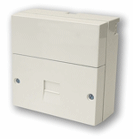 In most homes the BT Master Socket (NTE5 Faceplate), which is usually larger than most and has a detachable front faceplate (see picture, right) with two screws either side, is the first output for telephone services in your property and as a result it is also likely to deliver the best performance. Where possible you should connect your router/modem hardware here.
2. Shorten the phone cord between your router and the phone socket
Avoid using long phone extension cables when connecting your router or modem to the phone socket. Long cables can suffer from signal degradation and adversely affect your broadband performance, not least because you are exposing more of the connection to a wider area of potential environmental interference. The performance loss is usually not significant but, where you can, try to keep it as short as possible.
3. Make sure every line extension has a Microfilter (Splitter) attached
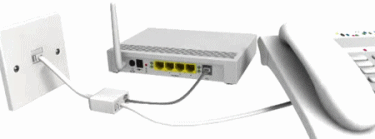
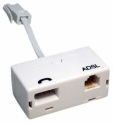 A Microfilter is a small device that plugs into your normal BT socket and splits the line into both a voice (telephone) and data (ADSL) connection. This allows you to make phone calls and surf the internet at the same time. Ideally you should make sure that every phone socket in your home has one of these little devices attached.
Failure to do this could cause noise on the line and disrupt your broadband connection. It's very easy to miss some sockets that might be hidden behind sofa's or in your garage etc. Likewise we would also recommend removing any telephone extensions that you don't need any more.
Take note that if your Microfilter is ISP supplied then it's probably made with cheaper components. Sometimes lashing out a little extra cash on something better can help (XF-1E Microfilter), but in reality you probably wouldn't spot any real difference.
