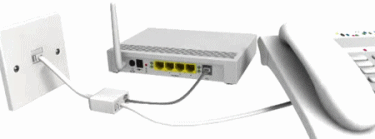
 4. Keep the router and phone socket area clear of other electrical devices
ADSL is extremely susceptible to environment interference, such as from microwave ovens, cordless (DECT) phones and AC adapters. BT once recorded a case where one man's faulty power adapter knocked out the broadband for an entire street. Old fashioned twinkling Christmas tree lights are also notorious for creating similar problems.
In reality this is only very rarely a real problem, but it certainly doesn't hurt to keep other electrical devices as far away as feasible from your ADSL socket and router connection. A period of selective on/off (power) testing with different home equipment may help to identify a fault power adapter or similar causes of interference.
Take note that some cheap cordless DECT phones cause so much interference that a single Microfilter may not be enough to iron out the problem. You can double up the filters but we suggest buying a good quality DECT phone instead and or not plugging it into the same line as your broadband in the first place.
5. Don't disconnect and reconnect too often
Though not an issue for everybody, it's usually good practice to avoid repeatedly switching your router on and off again (i.e. more than twice in any given 24 hour period, though it usually takes more than that). Many broadband lines, especially BT based ones, will interpret this as a problem (e.g. interference) and may lower your connection speed to improve stability. Broadband routers use hardly any power anyway and are designed to be "always-on".
However it should be said that the odd reboot every once in awhile can be useful, especially if your old connection state has developed an usual problem.
6. Queue big downloads for the night-time
It's good practice to use a Download Manager (there are plenty of free ones online) so that any larger files you need to get are sent to your computer during off-peak hours. Not only will this be faster because fewer people are active late at night, but it also puts less strain on the ISP’s network and causes other users fewer congestion problems (broadband runs off a shared contention, try to use it respectfully).
Some ISP’s also allow "free" (unlimited) downloading during off-peak hours, thus preventing heavy downloads from using up your monthly quota.
7. A “faster” download speed doesn't always improve multiplayer
Many gamers make the mistake of assuming that a faster broadband connection (e.g. 24Mbps+) will improve their online multiplayer performance, yet this is often incorrect. Multiplayer games rely on server response time (latency) rather than raw data transfer speed, hence why a 1Mbps connection can often be just as good as 20Mbps.
The best advice is to pay extra for a smaller and less congested ISP, which is likely to return a more responsive Internet connection. Providers that block or restriction P2P (File Sharing) services should also be treated with caution as some games and services use P2P methods for updating (e.g. World of Warcraft, Steam etc.), which could slow your gameplay down or possibly make it unplayable.
Likewise you should use a Wired link to your router and avoid Wi-Fi as this adds additional instability and latency between your computer and the internet connection. Cables are also more secure than wireless links.
Finally some ISP’s may enable Interleaving on your ADSL line to improve stability and prevent disconnections as a result of line noise or other issues that affect performance. Generally speaking this is a good thing, yet online gamers may find that it increases their multiplayer ping (latency) times by up to 40ms (milliseconds).
Thankfully some ISP’s will accept requests for interleaving to be disabled, although you must be confident that your line is working properly before doing so. For the most part this feature is set to either “off” or “automatic” and we would not normally recommend having it adjusted from the default.
