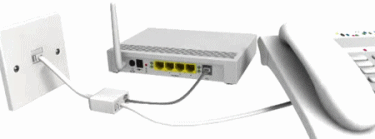
 8. Check all the cables and connectors
It's a good idea to keep a spare pair of any cables, Microfilters or connectors you may be using. All of these things can sometimes develop problems and it's wise to unplug and re-plug everything in with backups just to be sure. It's surprising how many people forget to plug something in, even experts sometimes do it. However in all likelihood this probably won't to be the cause of your problems.
9. Keep an eye on the router lights
Pay attention to the lights on your router, they're not usually there for decoration. Any that display RED or ORANGE could be warning you of a possible problem (varies from router to router, the manufacturers documentation should explain).
10. Use the latest Software Drivers and Firmware or get a better Router
Broadband routers don't need drivers, although USB Modems do and it's always good practice to get the latest version from the manufacturers website. However routers do sometimes need updating themselves, which usually involves downloading the latest Firmware version from the manufacturers website and uploading the file to your router (consult the routers manual). This often fixes bugs, adds extra features and sometimes improves stability and security too.
Sadly consumers rarely have much choice over the router modem their ISP supplies. Never the less it’s still worth pointing out that certain routers have been known to work better with problematic lines, such as those made by Netgear.
They’re unlikely to afford a great deal of improvement over your existing device, yet many cheaper alternatives are often more susceptible to line noise, not to mention connectivity problems during thunderstorms. Our old K-Corp router would drop every time lightning appeared, yet the newer Linksys one does not.
Advanced Tips and Tweaks
Those who feel a bit braver, or are more confident with making technical adjustments, should consider some of these tips and tweaks. In particular we recommend doing No.14.
11. Switch to OpenDNS Servers
Domain Name Servers (DNS) manage how your ISP translates IP addresses into human readable form (e.g. websites) and then back again. However some ISPs impose restrictions or may suffer from poor DNS performance, which can lead to problems loading web pages and the appearance of sluggish loading.
Luckily you can easily swap to a FREE alternative, such as OpenDNS Basic, which is often faster and can also give you additional control (i.e. restricting access to adult websites, if you have children). The adjustment can be made in any one of several different ways, as illustrated on their website.
http://www.opendns.com
12. Use Opera Turbo Cache (for slow connections only)
If your broadband connection is slow, such as around 1.5Mbps or possibly less, then try browsing websites with the latest FREE Opera website browser instead of Internet Explorer (IE). Opera includes a TURBO MODE that cleverly compresses webpage content on its servers, which can speed up web pages on slower connections.
http://www.opera.com
