 13. Switch Wireless (Wi-Fi) Channels / Upgrade to a Faster Wi-Fi Device
Many modern home broadband networks connect via a Wi-Fi (wireless) link. However if there are other networks within range of yours then it's a good idea to check which CHANNELS (01 - 11) they're using and switch to something different (usually possible through your routers Wi-Fi settings section). Using the same channel as everybody else can impact performance.
Likewise if you have a fast broadband line then you should make sure that the speed of your wireless link can keep pace; sometimes a router upgrade may be needed. Many older 802.11g (54Mbps) chipsets barely manage speeds of a few Megabits per second (Mbps), which could end up being slower than your fixed line broadband link. Routers with the latest 802.11n standard should be significantly faster.
12. Try a different PPP type
Sometimes, after having worked normally for awhile, when you switch the router on it may suddenly fail to establish a full Internet connection. Though many blame this on a problem with their ISP and wait for the connection to be restored, occasionally it can be fixed locally.
Try switching your routers PPP connection type from PPP_o_A to PPP_o_E or the other way around (consult the routers manual). This isn't support by all ADSL lines and if so then the issue could be related to something else, but it has helped some of our readers, myself included. However we’d suggest switching back to the previous/ISP recommended setting the next time you reboot the router.
13. Modulation Tweak for ADSL2+ Lines
Some ADSL2+ (up to 16-24Mbps) lines may appear to operate at a much slower speed after an upgrade from the older up to 8Mbps ADSL (e.g. ADSLMAX) service. If this is the case then you can try adjusting the modulation from MultiMode or other to G.DMT and that will force the router to use the older ADSL1 specification (may not work for everybody). Make sure to keep a note of your previous settings in case you need to switch back. It's usually only worth trying this on lines that run significantly slower than 7-8Mbps after the upgrade to ADSL2+ (lines that run faster than 8Mbps clearly benefit from ADSL2+ and wouldn't need to try this).
14. Remove the Mastersocket Faceplate / Fit a Ring/Bell Wire Filter (BT Broadband Accelerator / iPlate)
Many homes connect their phone cords into a thick rectangular BT box (Mastersocket), usually positioned near the floor. However most people don’t realise that the bottom half (faceplate) of these boxes can easily be unscrewed to reveal a test socket behind.
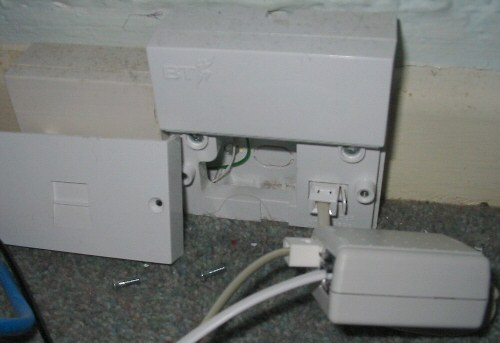
The test socket is identical in shape to the main one except for the fact that by removing this faceplate you may reduce line interference, producing a noticeable performance improvement that can also aid line stability.
However it is not recommended that you leave this exposed and should instead consider replacing it with a custom filtered faceplate that builds a microfilter directly into the design:
http://www.broadbandbuyer.co.uk/Shop/ShopDetail.asp?ProductID=3306
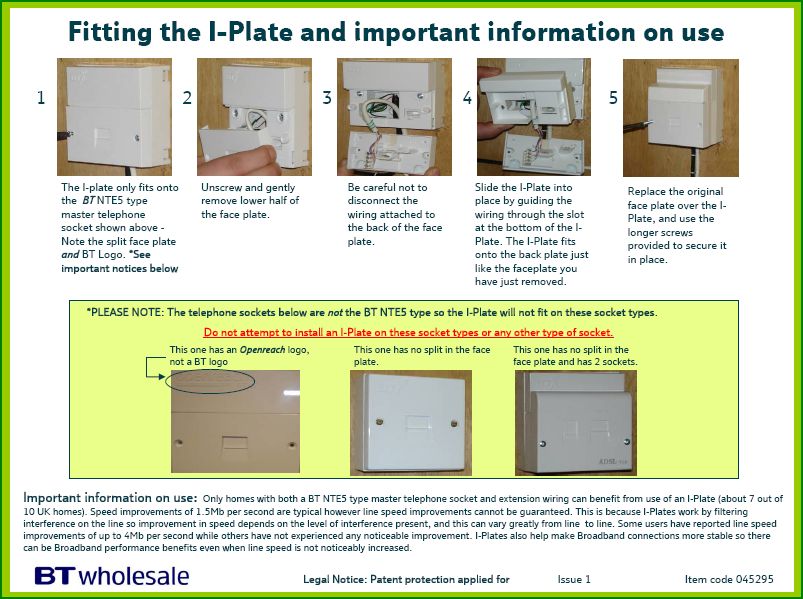
Those with Mastersockets that come with the BTOpenreach logo on top do not require a filter as it has one built in, although owners of the old NTE5 socket (picture above) may find it easier to install the BT Broadband Accelerator iPlate device than a fiddly Custom Faceplate Filter as linked above. BT iPlate's are cheap (about £10), easy to fit and can really improve broadband performance and connection stability if that is a problem:
Typically all faceplates are not equal and some boxes may be different or fail to produce the desired result. Technically minded individuals may want to remove the ring wire too and should find the following of interest, but only if you know what you’re doing!:
http://www.rob-r.co.uk/other/UKphonecatwiring.htm


