Amazon Set to Release Redesigned and Faster Fire TV Software and UI
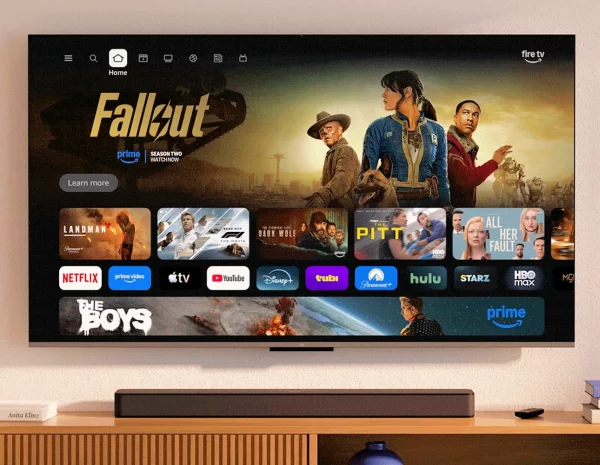
Internet retail giant Amazon has announced that owners of their Fire TV line of broadband streaming sticks and internet-connected televisions will in the near future receive a major software (firmware) update, which will deliver a new and faster User Interface (UI), as well as a “transformed” Fire TV mobile app. But UK users will have a longer wait.
The “redesigned user interface” is said to be “cleaner, faster, and better organized“. For example, in some cases, Amazon are claiming to see up to 20–30% gains in speed when using the new UI after their development team rebuilt the underlying code.
The new UI also makes it easier to search for content across all your subscriptions (e.g. you’ll see titles from all the apps you use) and, on top of that, they’ve given it a more modern design with improved layouts, rounded corners, redesigned colour gradients, updated typography, and more optimized spacing.
Advertisement
Amazon has also increased the number of apps you can pin to your home screen from 6 to 20, and you can now press the ‘Menu’ button on your remote to quickly get to Games, Art & Photos, and the Ambient Experience. And with Amazon Photos on Fire TV, you can connect your personal photos so they show up on the biggest screen in your home.
“We’ve also added a shortcut panel you can access by long-pressing the Home button on your remote. It gives you quick access to the most-used controls on Fire TV, including audio and display settings, your connected Ring cameras, and smart home device management,” said the announcement.
Finally, the redesigned Fire TV App adds the ability to browse content, manage your watchlist, and play titles on your TV — all while adopting the same look and feel as the new Fire TV design. You can also use your phone as a second screen to discover what to watch next or add a friend’s show recommendation to your watchlist when you’re away from home.
All of these improvements will be made available to existing customers via a free software update. The new Fire TV UI and mobile app will launch starting in February 2026 on the Fire TV Stick 4K Plus, Fire TV Stick 4K Max (2nd Gen), and Fire TV Omni Mini-LED Series in the USA, while people in the UK and those with other / older Fire TV devices will need to wait until “later this spring” (older devices include Fire TV 4K streaming media players and TVs like the Fire TV 2-Series, Fire TV 4-Series, Fire TV Omni QLED Series; TVs made by partners like Hisense, Insignia, Panasonic, and TCL).
Advertisement
Sadly, there’s no mention of Fire TV’s streaming sticks receiving support for the UK’s broadband-based Freely TV streaming service, although it’s already on some of their newer 2024+ TV sets – here.






Mark is a professional technology writer, IT consultant and computer engineer from Dorset (England), he also founded ISPreview in 1999 and enjoys analysing the latest telecoms and broadband developments. Find me on X (Twitter), Mastodon, Facebook, BlueSky, Threads.net and Linkedin.










« BT Group UK Sells US Government Contracting Subsidiary to TSCTI















Is this going to remove a load of non-app store apps at the same time, and then prevent them being installed again?
My gues would be- absolutely!!!
I believe so. I foresee a large pile of Firesticks heading for landfill.
You mean like they’re doing right now with ‘piracy apps’ on the exisisting home screen?
There’s litterally been a process for over a decade called ‘Not In My House’ which they’ve previously used to block home screen replacements.
The real question I have is whether the sideloaded apps will still appear on the home screen. IIRC many years ago they did at one point block e.g. sideloaded Kodi from appearing, making it inconvenient to open as you had to go through the settings (officially).
At some point the fireTV android app stopped storing the discovered fireTVs, and did a network search every time it launched. This slowed things down, and broke it on my LAN because I have the fireTV on a different VLAN and IP range to the mobile. I’d like to hope they fixed this. But I doubt it. (best option would’ve been a manual add device option, but almost nothing supports this any more..)
Why on earth do you have a VLAN on your home network? Suspicious…
@SquareSausages, we had a spate of burglarys taking place in and around my village, I hurriedly installed CCTV, my regret while I was fit and healthy running separate cables to my cameras.
I should have and the put the CCTV on a separate VLAN, do things in haste, repent at leisure.
@SquareSausages
Why are you suspicious of VLANs?
I use VLANs as a security measure, if a device somehow gets hacked/infected it’s at least isolated from the rest of my home network if it tries to scan for other vulnerable devices.
I’ve dealt with first hand an infected NVR.
I also use them to restrict stuff e.g. old computers I want to use FTP but not access the internet.
See they haven’t removed the way to externally install illegal IPTV apps.
They’re taking a different approach, at least for now, they blocking specific app packages rather than removing sideloading (Vega OS aside).