Sky UK Trying to Fix Access Point Temporarily Full Router Bug
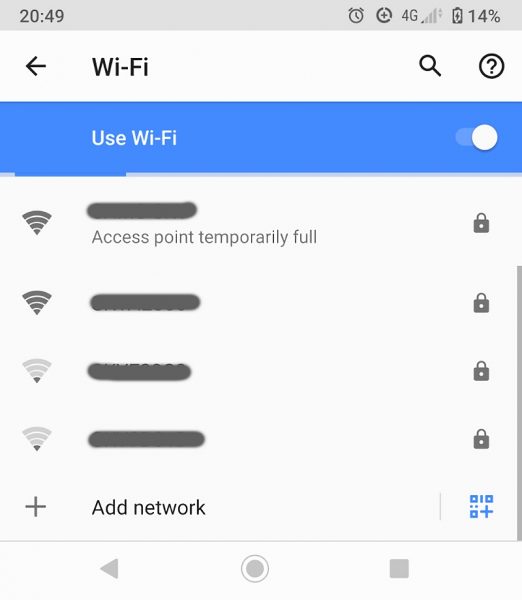
Some of Sky Broadband’s UK ISP customers, mostly those with one of their latest Sky Hub routers (SR203), are being faced with an intermittent bug that results in the WiFi connection giving an “access point temporarily full” message and disrupting local connectivity, even though the router is well below its device limit.
The problem was first spotted at the start of this year and meant that some wireless devices couldn’t connect to a home WiFi network created by the SR203 router, while others would temporarily drop an existing connection. At this point a quick glance down the list of accessible WiFi networks would reveal that the Sky’s WiFi ID (SSID) is listed with the following message underneath: “Access point temporarily full.”
Most wireless routers have an upper limit of maximum connections that they can handle before problems occur, although modern routers – even the budget kit bundled by big ISPs – can usually handle more than even some of the biggest households could throw at them. But in this case Sky’s router has also been running into problems with only a few devices being connected and live.
Advertisement
A number of related threads about this can be found on Sky’s community forum, although one in particular has merged several of these together and does a good job of summarising the experiences (here). The complaints go all the way back to January 2020 and a similar issue has also been spotted by some customers on the previous Sky Q Hub (ER110/115) router.
Sample Customer Complaint by bashie1970
“I’m having connectivity issues with my broadband router. In the last few weeks various devices have dropped connectivity for 5 minutes at a time. I have followed the standard “reset the router to factory settings” advice from sky support, and it temporarily worked, but 24 hours later I’m getting the same issues. The error is coming up “Access point temporarily full”.”
Sample Customer Complaint by Cob1694
“I’m having the exact same issue. No extenders connected to the network. Cannot connect to wireless network as it says on all devices “Access Point Temporarily Full”. First time I’ve had this issue.”
Sample Customer Complaint by Ballooner
“We have been having this issue for over a year now. A day ago Sky went down in our area. We received texts from Sky apologising for the inconvenience etc. Finally back up now with Access Temporarily Full like the rest of you and when I do get online, the connection drops constantly. We’ve been with Sky for many years and their routers have always had issues. We may look into changing provider as Sky doesn’t seem to take their customers seriously. Can you imagine having this problem for so long and being told on the phone that your connection is fine. It makes you feel like you’re at the doctors with a pain they can’t diagnose and you feel crazy!
PLEASE FIX YOUR ROUTERS”
Some people have been able to resolve the bug by doing a hardware reset of Sky’s router, but most of those who tried this found that the issue soon returned. The good news is that Sky Broadband are aware of this issue. The bad news is that they don’t yet have a fix and don’t know when that situation will change.
Sky has also recommended that customers who experience this problem while connecting a Sky Q TV box should go into ‘Settings’, then ‘Setup’, then ‘Preferences’ and under ‘Standby mode’ put the box into ‘Active’ mode (it’s unclear why this would work).
A Sky Spokesperson told ISPreview.co.uk:
“We are aware of this and are working hard to implement a suitable solution for our customers. If the message continues, customers should contact one of our advisors. Once we have a more permanent solution, we will let you know.”
Sadly, this isn’t the only bug known to be afflicting network connectivity on the SR203/204 series routers (Sky Broadband Hub) as the device also suffers from a potentially related problem with DHCP. The Dynamic Host Configuration Protocol (DHCP) is one of those seamless bits of modern networking that works automatically in the background, enabling your router and devices to automatically exchange information, setup IP addresses for the network (e.g. subnet mask and default gateway) and get the internet connection working alongside.
Advertisement
However, some customers have found that DHCP in the SR200 series seems to struggle to correctly assign its addresses to devices, particularly after the router is restarted. A lengthy post about this can be found on Sky’s forum (here). Sky’s support agent Mark-Br said last month: “The issue described in the thread will be addressed in the next round of updates. I’ll let you know when I get confirmed date of when that process will begin” (customers are still waiting).



Mark is a professional technology writer, IT consultant and computer engineer from Dorset (England), he also founded ISPreview in 1999 and enjoys analysing the latest telecoms and broadband developments. Find me on X (Twitter), Mastodon, Facebook, BlueSky, Threads.net and Linkedin.









« H1 2020 BDUK Take-up Data – UK Superfast Broadband Rollout
Full Fibre UK ISP Hyperoptic Launch Nokia Hyperhub Router »

















Comments are closed