Broadband and Mobile Networks Strained by UK Heatwave – No Major Blackouts Expected
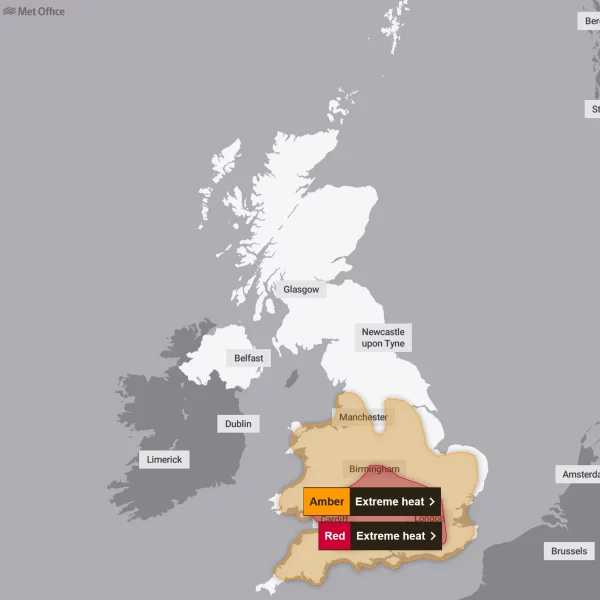
A few years have passed since we had a national heatwave that, across a large swathe of the country, pushed daytime temperatures to around the 40c level. Today and tomorrow will see similar temperatures and that’s going to cause some broadband and mobile infrastructure to struggle, albeit almost certainly without major national blackouts.
So far, the current heatwave hasn’t really pushed too many systems beyond their limits. In some areas, such as through the deployment of passive full fibre infrastructure (i.e. often, but not always, the heat generating hardware for this isn’t in street cabinets, it’s in air cooled exchanges / data centres), the country could even be said to be more resilient to heat than it was the last time the mercury hit this sort of extreme in 2022.
Naturally all electronic devices tend to emit some heat, even if you can’t always feel it. For example, most consumer router manufactures are aware of this and typically design their hardware to operate at temperatures of up to around 40c (this will vary a bit between manufacturers). Similar rules exist for all sorts of networking equipment, which can naturally be more of a problem if your kit is more exposed (i.e. doesn’t benefit from aircon).
Advertisement
However, much of the hardware with a stated tolerance of up to 40c may actually continue to function for a handful of degrees past that point, but experiences do vary and equipment (e.g. fans and heat sinks) are often used to help keep things under control. As above, at an extreme, we might again see a few engineers pitching umbrellas over the odd street cabinet here or there.

In the home a broadband router or Smartphone that overheats, or which nears the point of overheating, will often do one of several things. The most likely outcome is that the device’s processor (CPU / APU) will throttle back to cut power draw and performance will be reduced, which might impact your LAN / Wi-Fi speeds or device stability. Past a certain point the router may even restart itself or completely shut down to protect the device from damage.
The hardware that network operators use will often behave in a similar sort of way to help protect more exposed parts of a network from excessive heat and some failures are thus certainly a possibility, although these are usually more localised. But in other cases, the network will usually adjust itself to manage, which could still impact performance in some locations. Overall, a major short-lived heatwave like this won’t cause major national outages, only more localised and limited disruptions.
Advertisement
In the UK such heatwaves are still quite rare and so our networks usually only need modest protection from extremes of heat, although this could change as the world continues to warm up and extremes continue to become more common.
Met Office – Top Five Warmest Years in the UK on Record (annual average)
2025: 10.09 °C
2022: 10.03 °C
2023: 9.97 °C
2014: 9.88 °C
2024: 9.79 °C
One study from last year suggested that broadband download speeds can slow by up to 8% and uploads by up to 27% on the hottest days of the year (here), but take that with a pinch of salt as the methodology used in that report generated more questions than answers.
In terms of the domestic setting. The vast majority of people are already sensible enough NOT to stick their broadband routers in direct sunlight or place it on top of an existing heat source (it doesn’t take a heatwave to break a router if you do this). Otherwise, we’ll repeat the same tips we’ve given out in the past.
ISPreview’s Top Tips for Keeping Broadband Routers Cool
1. Never place it in direct sunlight, obviously.
2. Never allow your pet to use the router as its own personal sleeping mat. Yes, it might seem cute, but the slim risk of this causing an electrical fault, fire or overheating is something best avoided.
Just remember, cats can be wonderful jerks, so they won’t obey your orders and even placing said device within a ring of defensive orange peel may not be enough to stop their unwanted advances toward your personal centre of internet excellence.
3. Place the router on a hard and flat surface (ideally something cool), which should allow the air to move freely around it (especially below the device). Wall mounting the device can also help (vertically), provided the wall itself isn’t transmitting a lot of heat (e.g. south facing walls with no cavity insultation will get warmer). In other words, never put your router on a surface that doesn’t allow heat to escape.
4. Some older / cheaper routers and chipsets are more susceptible to heat problems, especially if they’ve had a lot of usage and gathered plenty of dust, and at the extreme you might need to consider buying a newer device. Mind you, having an ultra powerful device can sometimes be similarly problematic. Granted, this is a pretty rubbish “tip“, so let’s move on.
5. Consider buying a cheap laptop size cooling mat / pad for the router. Kit like this can be had for around £20 (examples) and often includes a small internal fan. Alternatively, any old cheap fan pointed at the router will do, but this often isn’t really necessary.
6. If the heat is truly horrific in your home (i.e. 40c+), then it may be wise to switch the router off when not in use. In fact, get out of the house yourself and find shade and ice. But don’t restart it too often if you’re on an older DSL (ADSL, FTTC etc.) based connection, as not all lines respond well to being repeatedly switched on and off during the day (may result in a loss of line speed due to DLM systems). But in our experience, there’s usually not much harm in turning it off once in the day for a period, although this really is a last resort.
7. Disable non-critical router services when not needed. The less the router has to do, the less heat it will produce and the faster it can operate. Some routers allow you to disable specific services (e.g. wi-fi, connection logs etc.) and, during hot weather, this can help to keep the device running smoothly. On the other hand, it’s probably best not to fiddle with these things unless you know what you’re doing.
8. Situate the router in the coolest room possible, which is often the lowest point in your home with the thickest walls. Unfortunately this might constrain the performance of your wireless network, thus there’s a careful balancing act to consider.
9. Buy Air Conditioning for your home, provided you can afford the energy bills or have a solar/battery system to off-set the usage.

Hopefully it goes without saying that pouring ice or ice water over your router, or even putting it in the fridge, are both things that should be avoided. Remember that even if you put the ice behind something, it will still attract condensation and you don’t want that dripping on electronics inside your home!
Advertisement
Otherwise, we’ll be keeping a close eye today to see how networks cope – particularly in the Red Warning areas of England and Wales, but the message is to focus on keeping yourself cool and not to worry about national broadband and mobile infrastructure. On the whole, the latter will cope, but you might not.






Mark is a professional technology writer, IT consultant and computer engineer from Dorset (England), he also founded ISPreview in 1999 and enjoys analysing the latest telecoms and broadband developments. Find me on X (Twitter), Mastodon, Facebook, BlueSky, Threads.net and Linkedin.













« ISP TalkTalk Pauses Sale of FTTC Broadband Lines to New UK Customers
















I turned off my Pi nas, it has passive cooling and is in the cupboard under the stairs, so better to be safe than sorry. I will turn it back on if i need it.
I need to get a fan for it.
I do wonder about my router, it is in the same place as my Echo unit and that gets warm, it is on a shelf, so should be okay.
I bet the fans are going crazy on the cabinets now. 8.30am and according to my outside sensor, already 25 degrees. i have stuff to do up here, but not going to get done, far too warm up here and I can’t cope with the heat like I used to be able to.
I’m not owned by a cat but are they really trying to get on warm things in this weather? Crackpots.
Shade is preferable for cats, but on the other hand we had one that insisted on cooking itself in direct sunlight, although I suspect self-preservation might discourage such activity today.
I had my 5G FWA in the loft and it overheated. I would mount it outside, but ironically the signal is too strong and swamps the receiver. For now I’ve moved it to another room. I really hope the tower doesn’t overheat as it’s the only connection we have.
Except of course, dodgy incoming mains power led to half the internet disappearing for a couple of minutes last night when the Global Switch 2 Datacentre in London, which is a major interconnection point for a huge number of circuits, suffered a 500ms cut in power when switching to their Flywheel/Diesel power backup. Happened 8.35pm last night, and the outage list on Downdetector was huge. They are currently running on mains power with NO UPS backup!
Internet keeps going on and off.